Independent guideUpdated 2026-09-08
Shree Win troubleshooting: every common error and the fix, in one place
When Shree Win is not working, the cause is almost always one of six things: a deposit that has not matched its order, a withdrawal blocked by the turnover line or missing bank details, a login that fails on the wrong tab or an old build, an account the platform has restricted, a gift code that has already run out, or a password you no longer have. Each section below gives the cause, the fix in order, and the point at which in-app customer service becomes the only route. Nothing here needs a third-party tool, and nobody outside the app can release your money.
On this page9 sections
- Deposit shows To be paid or money was debited but not credited
- Withdrawal pending, rejected, or the Withdraw button is locked
- Login fails, network error, or the app will not open
- Account restricted or blocked
- Gift code rejected, expired, or already used
- Forgot the password
- Before you contact customer service: what to have ready
- Things that look like errors but are rules
- Frequently asked questions
Error, cause, first fix
| Problem | Usual cause | First thing to do |
|---|---|---|
| Deposit "To be paid" | Amount differs from the order / order expired | Do not pay again; send order id + UTR to in-app support |
| Withdraw button locked | Turnover line, no UPI/bank added, under the method minimum (Rs 110 bank / Rs 2,100 UPI), or 3 used today | Read the turnover line, then Add UPI or bank |
| Withdrawal rejected | Typo in UPI ID / account number | Fix the field, resubmit once |
| Login fails | Wrong tab, country code, old build | Phone tab + +91, reinstall current build |
| Network error | Request not reaching the server | Switch Wi-Fi/data, disable VPN, retry |
| Account restricted | Age/state rules or platform flag | In-app customer service only |
| Gift code rejected | Pool empty / expired / already used | Wait for the next official drop |
| Forgot password | Password lost | Forgot password? → phone reset with SMS code; customer service if no code |
Deposit shows To be paid or money was debited but not credited
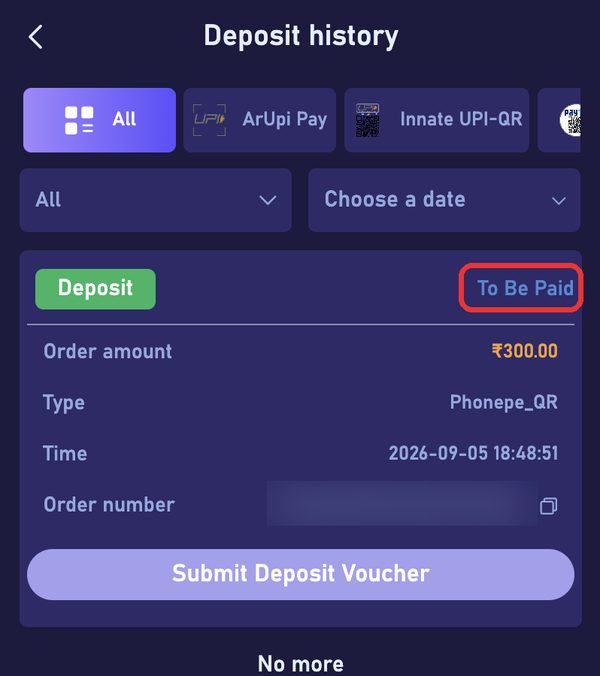
To be paid means the order is open and no transfer has matched it yet. A matched transfer normally credits within minutes.
The three causes that keep it open: the amount you sent differs from the order (Rs 499 against Rs 500 does not match), the order expired before you paid, or you paid a QR saved from an earlier order.
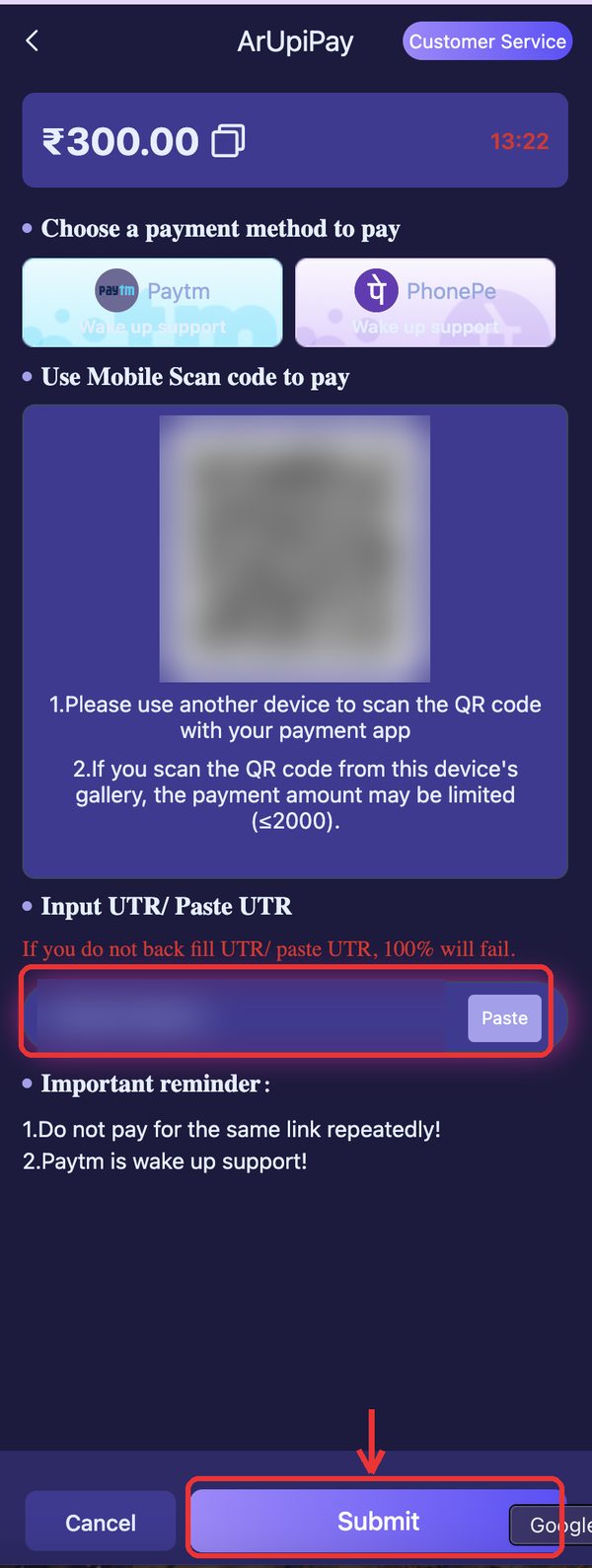
Never cancel an order you have already paid and never pay it twice; the paid order is the record customer service uses to find your money. The full deposit walkthrough is on our deposit page.
Wait a few minutes and refresh the wallet.
Open deposit history and read the order status.
Compare the amount you sent with the order amount, rupee for rupee.
Copy the UTR or transaction id from your UPI app.
Open in-app customer service and send order id, amount, UTR and the payment screenshot in one message.
Withdrawal pending, rejected, or the Withdraw button is locked
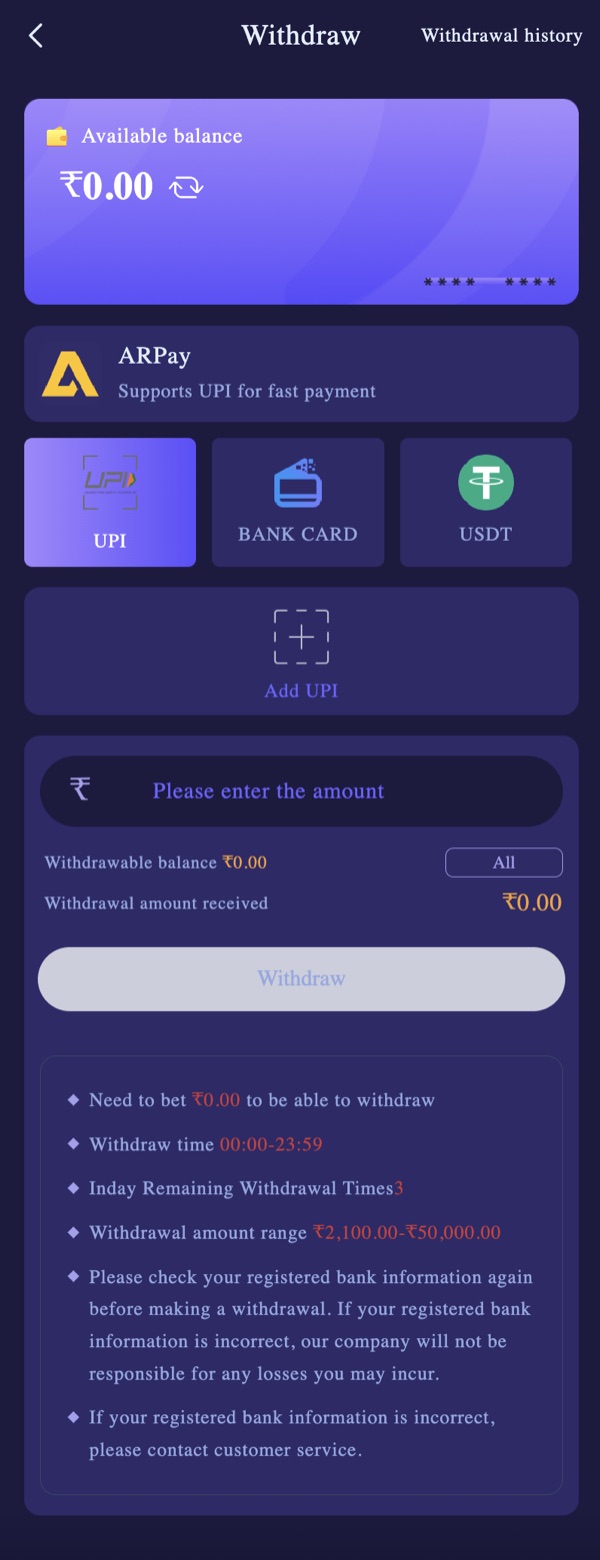
A locked button means a condition is not met: the line 'Need to bet Rs X to be able to withdraw' still shows an amount, no UPI or bank account has been added, the request is below the minimum for that method (Rs 110 by bank card, Rs 2,100 by UPI), or you have already used the 3 withdrawals allowed today.
A rejected request is almost always a details problem: a typo in the UPI ID, an account number that does not match the IFSC, or a method chosen with no matching details saved.
Pending is not an error. The platform publishes no processing time, so anyone quoting exact minutes is guessing. The withdrawal-problem guide walks the full checklist; the withdrawal page has the limits and screens.
Read the turnover line on the Withdraw screen; if it shows an amount, that is the block.
Check Add UPI or the bank details character by character.
Confirm the amount is between Rs 2,100 and Rs 50,000 and that you have not used 3 requests today.
Submit once; do not cancel and resubmit.
If it stays pending after a genuine wait, contact in-app customer service with the order id, amount, method and time.
Login fails, network error, or the app will not open
Four causes cover nearly every failed login. The wrong tab: an account registered by phone will not open from the Email tab. The country code: it must read +91 with a plain 10-digit number after it.
An old APK build: when the platform ships a new build the old one may fail at login or stall on the logo. A network error: the request never reached the server.
Pick the tab you registered with, Phone Number or Email.
Check +91 and retype the number without a leading zero.
Retype the password slowly with the show-password toggle on.
Switch between Wi-Fi and mobile data, turn off any VPN, and try once more.
Clear the app data or reinstall the current build from our download page, then log in again.
If the browser version fails the same way on two connections, the fault is on the platform side; wait and retry later.
Account restricted or blocked
If number, password, build and network all check out, the last possibility on your side is the account itself. Shree Win is for players aged 18 and over and is not offered in Andhra Pradesh, Telangana, Assam, Odisha, Nagaland or Sikkim; accounts outside those rules can be restricted, and so can accounts flagged for reasons the platform does not publish.
Nothing outside the app can read that status. Opening a second account on another number is a fresh, empty account and carries none of the balance, so it is not a workaround. The only route is in-app customer service from any device where you are still logged in, or the Agent line under Promotion if the question is about a referral team.
Gift code rejected, expired, or already used
Gift codes live under Activity, then Gift. A code fails for three reasons: the pool ran out (codes are limited and go within minutes of being posted), the code expired, or it was already redeemed on your account.
There is nothing to fix; wait for the next official drop and redeem it immediately. A code offered for a fee is not a gift code, it is the start of a scam. Our gift-codes page explains where real codes come from.
Forgot the password
The login screen's Forgot password? link opens a phone reset form: +91 number, new password twice, an SMS verification code (tap Send), Reset. Use it first.
If the code never arrives after two sends, or the registered number is gone, contact in-app customer service from any device still logged in (Account, then Customer Service) or from the login screen, with the registered number, registration month and last deposit amount. Never give the old password, an OTP, or a payment to anyone who contacts you first. The forgot-password page covers it step by step.
Before you contact customer service: what to have ready
Support moves faster when the first message already contains everything. One clear message beats five short ones, and one chat per order beats three.
The order id or withdrawal record (screenshot the status screen).
The exact amount, method and time.
The UTR or transaction id from your bank or UPI app.
A screenshot of the saved UPI or bank details if the problem is a payout.
Your registered +91 number, never the password.
Things that look like errors but are rules
The turnover line is a rule, not a bug: bets placed, not money added, reduce it. Three withdrawals a day and Rs 2,100 minimum are limits, not glitches. The Get Rs 500 tab is a spin wheel, so not seeing Rs 500 land after registering is expected.
And there is no phone helpline: every call, WhatsApp message or Telegram account presenting itself as Shree Win support is someone else. Support exists only inside the logged-in app.
Frequently Asked Questions
My Shree Win deposit is still To be paid after paying. Is the money lost?
Usually not. It means the transfer has not been matched to the order, most often because the amount differed. Do not pay again; send the order id and UTR to in-app customer service.
Why is the Withdraw button greyed out?
A precondition is not met: the turnover line still shows an amount, no UPI or bank account is saved, the request is under Rs 2,100, or today's 3 withdrawals are used.
Login says network error on mobile data but works on Wi-Fi. Why?
The request is not reaching the server on that connection. Use the one that works, disable any VPN, and retry the other later. If both fail and the browser also fails, it is platform-side.
Is there a Shree Win helpline number for stuck money?
No. Support is in-app only. Any number, WhatsApp or Telegram account claiming to be Shree Win support is not official.
Can this website fix my Shree Win account?
No. This is an independent guide with no access to accounts. We can explain a screen or a rule through support@shreewinlog.org; only the platform can move money or unlock an account.
More Shree Win guides
Disclaimer
This is an independent guide and affiliate website. We do not own or operate the Shree Win platform. We may earn a commission when you register through links on this site, which never changes what you pay or receive. Real-money games carry genuine financial risk and can be habit-forming. Strictly for adults aged 18 and over. Real-money gaming is restricted in Andhra Pradesh, Telangana, Assam, Odisha, Nagaland and Sikkim; residents of those states should not play. Set your own limits before you deposit, and stop if it stops being fun.