Independent guideUpdated 2026-09-08
Shree Win Deposit: Limits, Payment Methods and Recharge Rules
Rs 100 in at the low end, Rs 50,000 as the ceiling on one order. That is the full range of a Shree Win deposit, and everything else on the recharge screen exists to make sure your payment gets matched to the right order. Four channels, twelve preset buttons, two warnings printed in small text. This page walks through each of them, plus what to do on the day your bank debits you and the wallet balance sits still.
On this page9 sections
- How to make a Shree Win deposit, step by step
- Shree Win deposit limits: Rs 100 to Rs 50,000
- Four payment methods on the Shree Win deposit page
- Two recharge warnings that cost people money
- Deposit debited but not credited? Work this list
- After the money lands: games, cash-out rules, gift codes
- What the +2% and Get Rs 500 actually are
- Before you top up: age, budget and state rules
- Frequently asked questions
Deposit limits and methods
| Detail | Shree Win deposit |
|---|---|
| Minimum deposit | Rs 100 |
| Maximum per order | Rs 50,000 |
| Quick-pick amounts | 100, 300, 500, 1K, 2K, 3K, 5K, 10K, 20K, 30K, 40K, 50K |
| Payment methods | UPI-QR, Innate UPI-QR, Paytm, ARPay |
| ARPay bonus | +2% on the recharge |
| Golden rule | Transfer exactly the order amount; never cancel a paid order |
How to make a Shree Win deposit, step by step
Sign in on the official Shree Win website with your +91 number and password. Not registered yet? Sign up first through the official Shree Win register page, where invite code 61328455290 comes pre-filled.
Open Account from the bottom bar (Home, Activity, Get Rs 500, Promotion, Account) and go to the deposit or recharge screen.
Pick your channel: UPI-QR, Innate UPI-QR, PAYTM or ARPay.
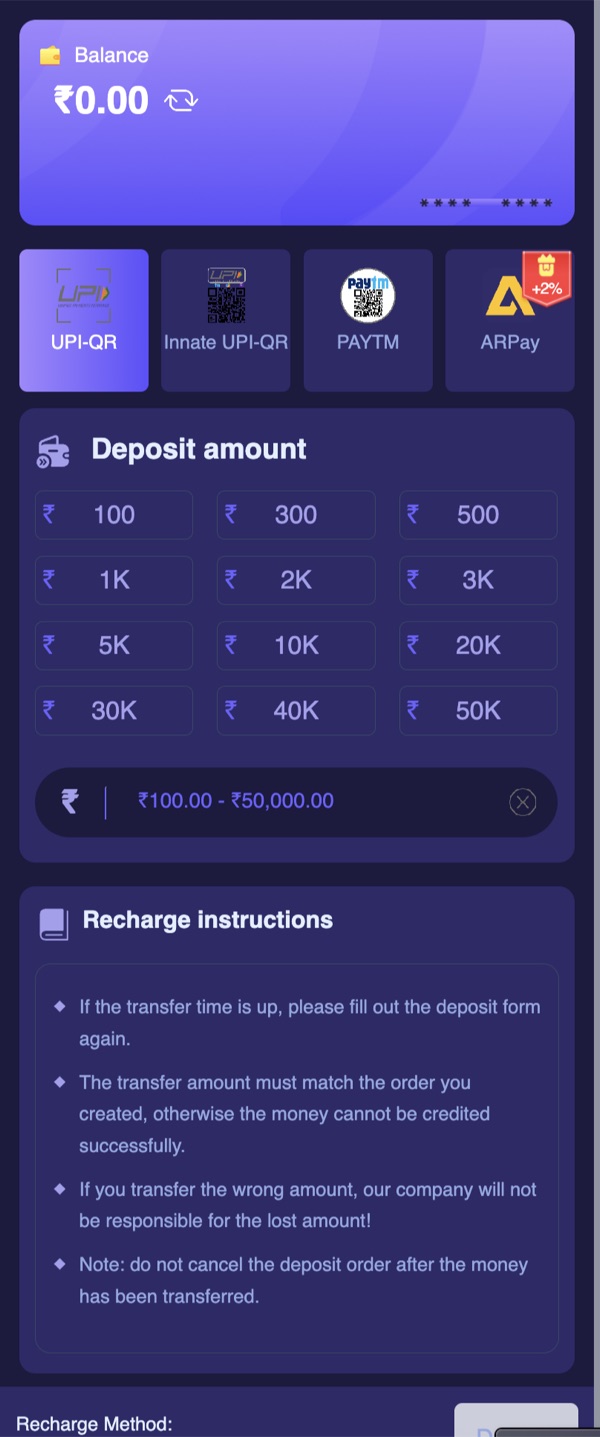
Tap a preset or type an amount between Rs 100 and Rs 50,000.
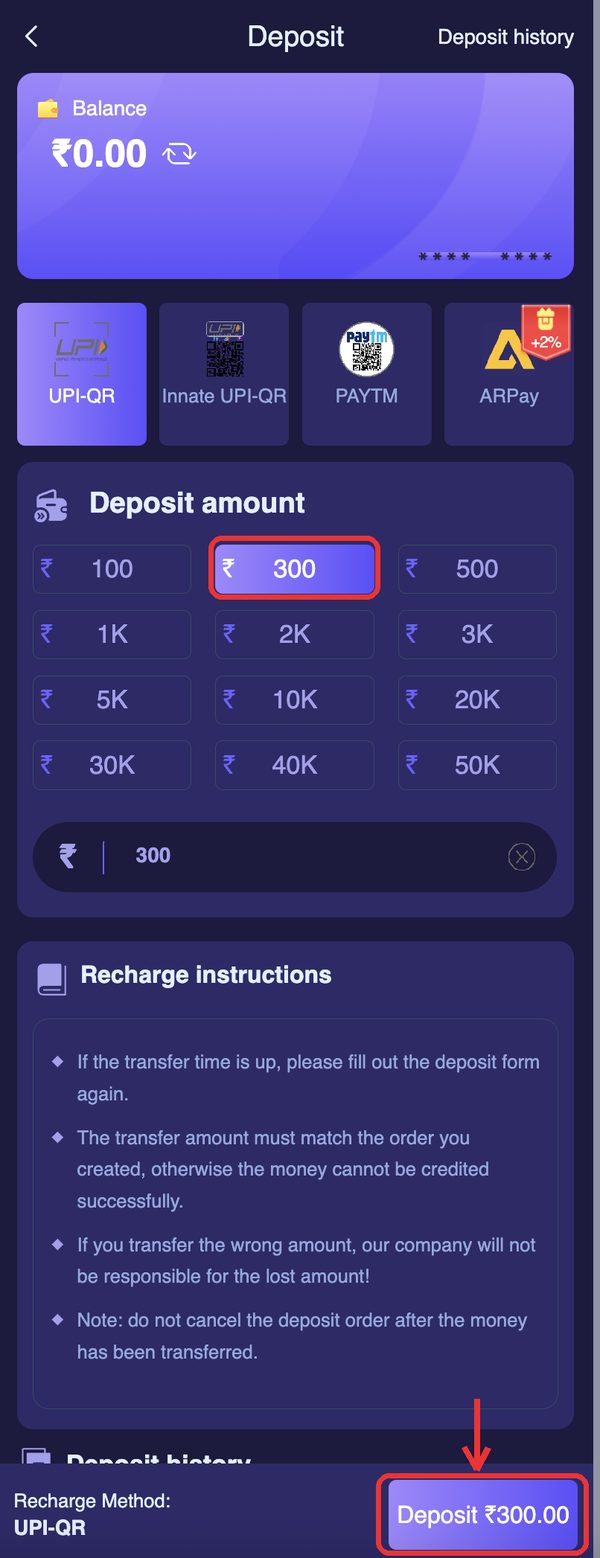
Confirm to create the recharge order. The screen now shows a payment target and one exact amount.
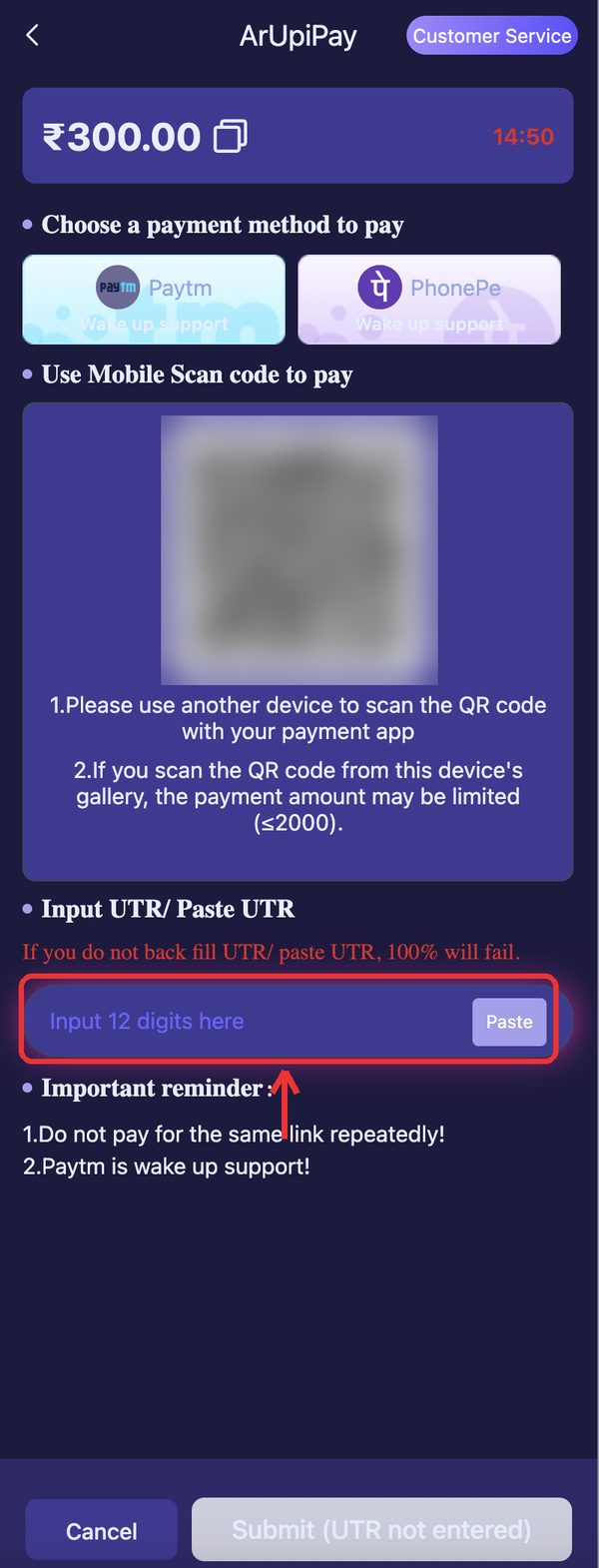
Screenshot that screen before you switch apps. You want the amount, the timestamp and the receiving details saved.
Pay that exact figure from your UPI app. Not rounded up, not rounded down.
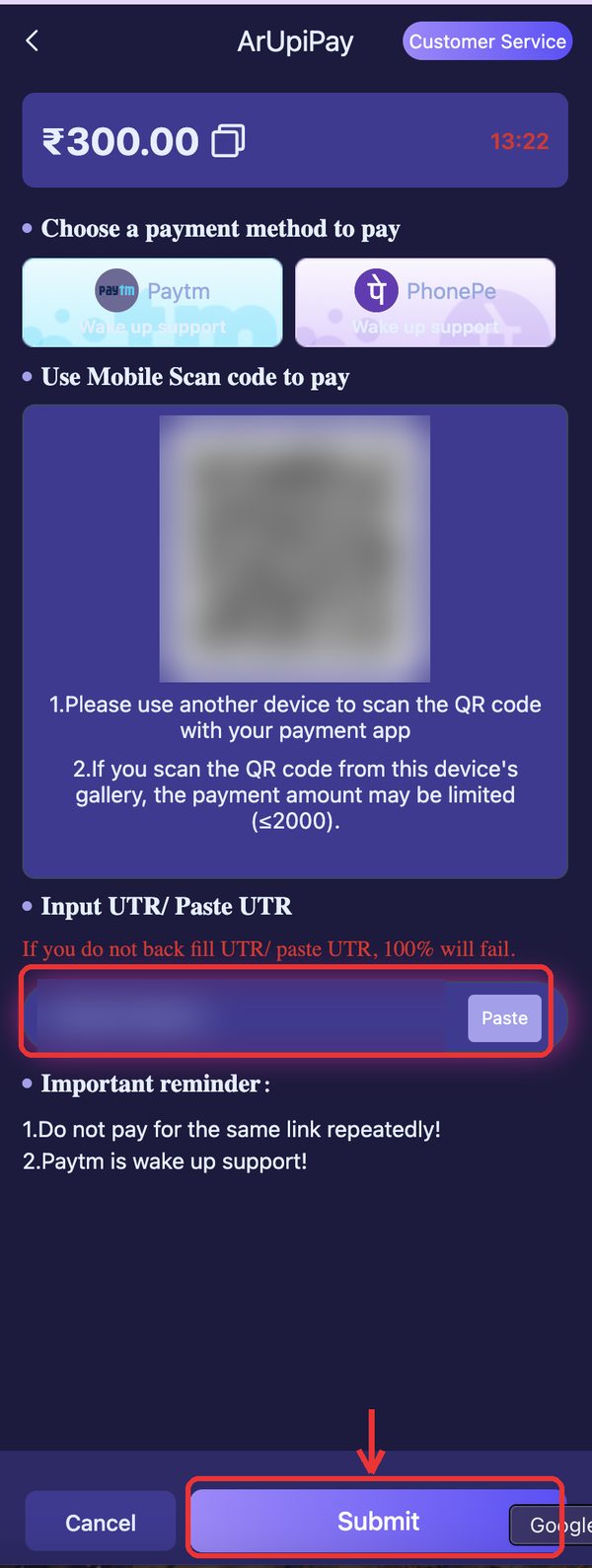
Come back to the app and let the pending screen resolve on its own.
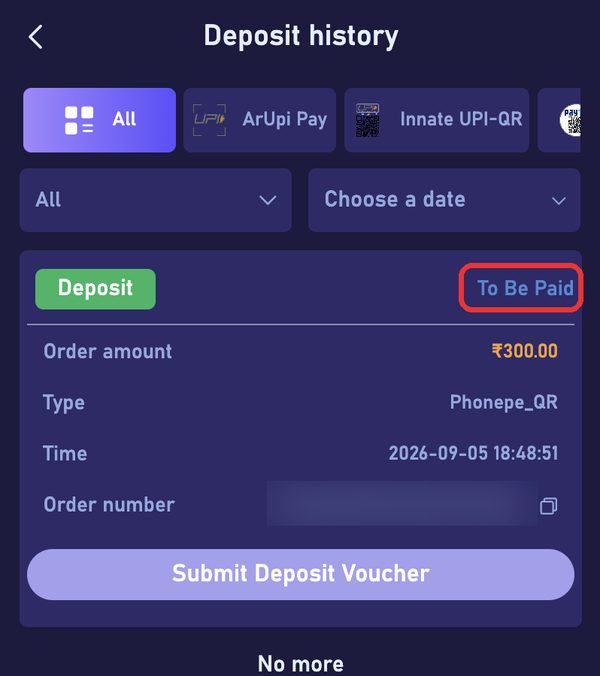
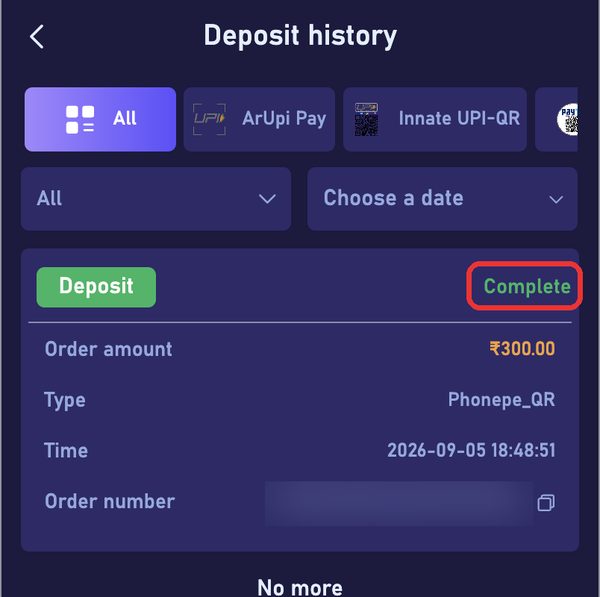
Check the balance under Account. Moved? You are done. Not moved? Keep the screenshot and copy the UTR from your UPI app.
Shree Win deposit limits: Rs 100 to Rs 50,000
Minimum Rs 100. Maximum Rs 50,000. The same range applies whichever payment channel you pick, and it applies per recharge order rather than per day.
Preset buttons on the screen: 100, 300, 500, 1K, 2K, 3K, 5K, 10K, 20K, 30K, 40K and 50K. Those twelve are shortcuts only. Typing your own figure works fine as long as it sits inside the range.
First Shree Win deposit? Use the 100 button. At that size you are not testing your luck, you are testing three boring things: whether the channel creates an order, whether your UPI app pays it cleanly, and whether the balance actually moves afterwards.
Know this before you fund the account: money goes in from Rs 100 but only comes out from Rs 2,100, with a betting requirement attached on the withdraw page. A Rs 100 top-up is a trial run, not a round trip.
Four payment methods on the Shree Win deposit page
UPI-QR is the default route for most players here. Scan the QR or copy the UPI ID into GPay, PhonePe, Paytm, BHIM or your bank app and pay from there.
Innate UPI-QR sits right beside it as a second UPI option. Reach for it when the first one errors out, times out, or refuses to generate an order.
PAYTM gets its own line on the method list. Sensible pick if Paytm is the app where your money already sits.
ARPay is the one channel carrying a +2% bonus badge on the deposit screen. It also supports UPI fast payment on the withdrawal side, which is why some regulars keep both directions on ARPay. Read that badge as a channel promo the platform controls, not a rate you are permanently owed.
Payment channels do go down. A greyed-out or repeatedly failing method usually means the route is having a bad hour, not that something is wrong with your account. Switch methods instead of hammering the same button ten times.
Two recharge warnings that cost people money
The recharge screen carries two instructions in small print. Both exist because players skip them and then spend a week chasing support.
One: the transfer amount must match the created order to the rupee. Order says Rs 1,000, you send Rs 1,000. Send Rs 990 or Rs 1,050 and the automatic matcher has nothing to pair the payment with, so the credit stalls until a person sorts it out by hand.
Two: do not cancel the order after transferring. Cancelling wipes the record your payment was supposed to attach to, and by that point the money has already left your bank.
Add a third habit of your own: one order at a time. Three open orders and a single payment will not produce three credits. One payment matches one order.
Copy the UTR or transaction reference from your UPI app on every recharge. It is the first thing customer service asks for, and having it in hand is what separates a quick fix from an endless back-and-forth.
Deposit debited but not credited? Work this list
Bank says money gone, app says balance unchanged. Frustrating, usually recoverable. Go in order, and hold off on paying a second time.
Give it a few minutes first. The pending screen and the wallet do not always update at the same moment.
Check the payment status inside your UPI app. You want success. Pending, failed or reversed means the money is still with the bank and will find its way back on the bank's schedule.
Copy the UTR or transaction ID, then take one clear screenshot showing amount, date, time and the receiving UPI ID.
Look at the recharge record inside the app. Is the order still open, expired or cancelled? Support needs that detail.
Open customer service and send it all in a single message: registered +91 number, order amount, exact payment time, UTR and screenshot.
Wait for the reply before touching anything else. Do not create a fresh order and pay again for the same top-up.
After the money lands: games, cash-out rules, gift codes
Your balance now works across Lottery (the Wingo colour prediction rounds), Mini Games, Slots, Fishing, Rummy, Casino and Sports.
Cashing out follows a separate rulebook, and reading it before you deposit is smarter than reading it after. Withdrawals run Rs 2,100 to Rs 50,000. Three withdrawal requests per day. The window is 00:00 to 23:59.
You add a UPI ID or bank account under your own account first through Add UPI, and the withdraw page shows a betting requirement written as "Need to bet Rs X to be able to withdraw".
Put plainly: deposited money is not the same as withdrawable money. Plan your top-up around that, especially if those funds might be needed back the same week.
Sitting on a gift code? Redeem it separately under Activity, then Gift, enter the code and tap Receive. It has nothing to do with the recharge flow.
What the +2% and Get Rs 500 actually are
Two things on this platform get mistaken for deposit bonuses, so let us be exact about both.
The +2% badge belongs to ARPay and appears on the deposit screen next to that channel. It is a channel-level promo. Note your balance before you pay, check it after, and if the extra never shows, screenshot the deposit screen and raise it with customer service.
Get Rs 500 is a tab in the bottom navigation bar, and it is a spin wheel promo. Not a guaranteed Rs 500 in your wallet, not a signup payout, and not tied to how much you deposit. Anyone on Telegram selling you a "confirmed Rs 500 bonus trick" is selling you nothing.
There is no fixed deposit-match bonus documented on the recharge screen beyond that ARPay badge. If a promo appears in Activity, read its own terms rather than assuming it applies to your top-up.
Before you top up: age, budget and state rules
This is real money riding on chance-based outcomes. Colour prediction rounds do not follow a pattern, and no prediction group, paid tip sheet or "hack" changes what the round does. Anyone charging you for a guaranteed method is charging you for a story.
Fix your monthly recharge budget before the deposit page is even open. Keep it to money that could vanish without touching rent, EMI, school fees or the week's groceries.
If you catch yourself topping up to recover what just went, shut the app for the day. That exact impulse is how a small hobby turns into a debt you hide from your family.
You must be 18 or older. Real-money gaming is restricted or prohibited in Andhra Pradesh, Telangana, Assam, Odisha, Nagaland and Sikkim. Rules and enforcement shift, so check where your own state stands before you send a single rupee.
Full disclosure: we earn referral commission when someone registers through our link. It does not move your deposit limits, your odds or your payouts, and it is not a reason to put in more than you decided on.
Frequently Asked Questions
What is the minimum Shree Win deposit?
Rs 100. That is the smallest recharge the deposit page accepts, and it is the sensible size for a first top-up before you trust the channel with anything larger.
What is the maximum I can add in one go?
Rs 50,000 per recharge order. Need more than that? Create a second order after the first one credits. Never try to settle two open orders with one UPI transfer.
Which Shree Win recharge method should I pick?
Start with UPI-QR if you use GPay, PhonePe or any UPI app. Move to Innate UPI-QR when the first channel errors out. PAYTM suits Paytm-first users. ARPay is the channel showing the +2% bonus badge, and it also supports UPI fast payment on withdrawals.
Is the ARPay +2% real extra money?
The +2% is a badge the platform prints on the ARPay channel, so treat it as a promo that can change rather than a guaranteed rate. Note your wallet balance before and after the recharge and see what actually landed. If the extra is missing, screenshot the deposit screen and ask customer service.
My money got debited but the balance did not update. Now what?
Do not pay again and do not cancel the order. Confirm in your UPI app that the payment shows success, copy the UTR, screenshot the receipt, then message customer service with your registered +91 number, the order amount, the exact time and the UTR.
Why does the transfer amount have to match exactly?
Each recharge order is matched to an incoming payment by its rupee value. Pay Rs 500 against a Rs 517 order and the automatic matcher cannot pair the two, so your balance stays put until support fixes it manually.
Can I deposit Rs 100 and withdraw it straight away?
No. Withdrawals start at Rs 2,100, you get three per day, and the withdraw page shows a betting requirement written as "Need to bet Rs X to be able to withdraw". A Rs 100 recharge is for testing the platform, not for cycling money in and out.
Does depositing get me the Rs 500 shown in the bottom bar?
No. Get Rs 500 is a spin wheel promo sitting in the bottom navigation, separate from the deposit flow. Whatever it pays comes from the spin, not from the size of your recharge.
Can I deposit using a friend's UPI ID?
Better not to. Withdrawals go only to a UPI or bank account you add yourself under Add UPI, and support may question a mismatched payment source. Keep the paying UPI and the withdrawal account in the account holder's own name.
More Shree Win guides
Disclaimer
This is an independent guide and affiliate website. We do not own or operate the Shree Win platform. We may earn a commission when you register through links on this site, which never changes what you pay or receive. Real-money games carry genuine financial risk and can be habit-forming. Strictly for adults aged 18 and over. Real-money gaming is restricted in Andhra Pradesh, Telangana, Assam, Odisha, Nagaland and Sikkim; residents of those states should not play. Set your own limits before you deposit, and stop if it stops being fun.