Independent guideUpdated 2026-09-08
Shree Win forgot password: how to get back into your account
The Shree Win forgot password route is a phone reset form, not a dead end. Tap Forgot password? on the login screen and it asks for your +91 number, a new password typed twice, a verification code sent by SMS, and a Reset button. That is the whole process when your registered number is still with you. If the code never arrives, or the number is gone, the fallback is in-app customer service. Nobody official will ask for your old password, an OTP over the phone, or a fee.
On this page6 sections
Password reset at a glance
| Detail | Shree Win |
|---|---|
| Reset method | Phone reset form: +91 number, new password, SMS verification code, Reset |
| Where to start | Forgot password? under the password box on the login screen |
| If no code arrives | Resend once after a minute; then in-app customer service (Account → Customer Service) |
| What never to share | The old password, a code, or a fee — with anyone who contacts you first |
| After the reset | Log in with the new password; check saved withdrawal methods |
How to reset a forgotten Shree Win password, step by step
The form is called phone reset. Have the phone with your registered SIM next to you; the verification code goes there.
Open the login screen and tap Forgot password? (the link sits under the password box, next to Remember password).
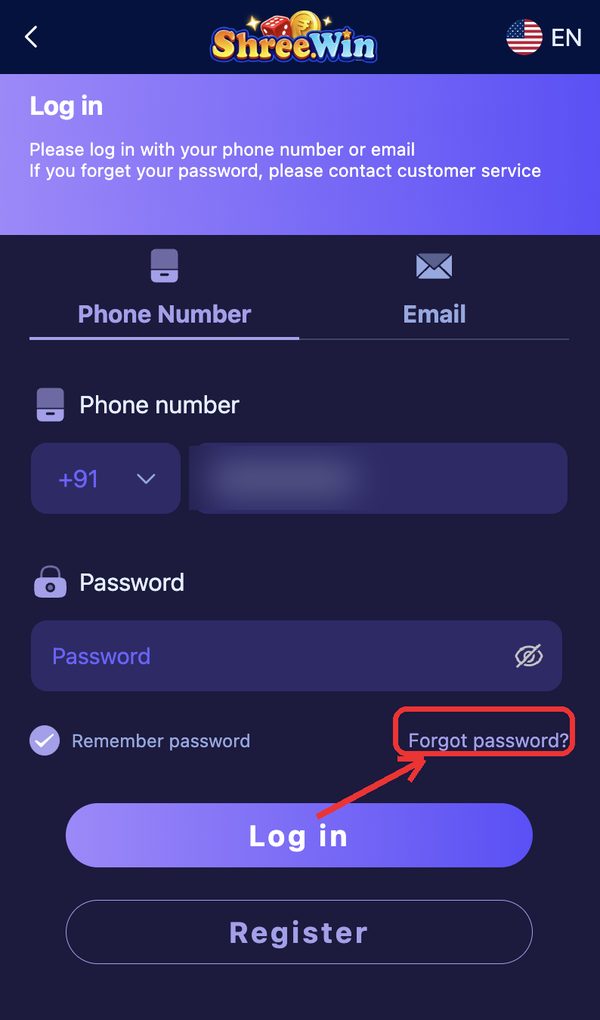
Keep +91 selected and type the mobile number you registered with.
Type a new password, then type it again in Confirm new password.
Tap Send beside the Verification Code box and wait for the SMS.
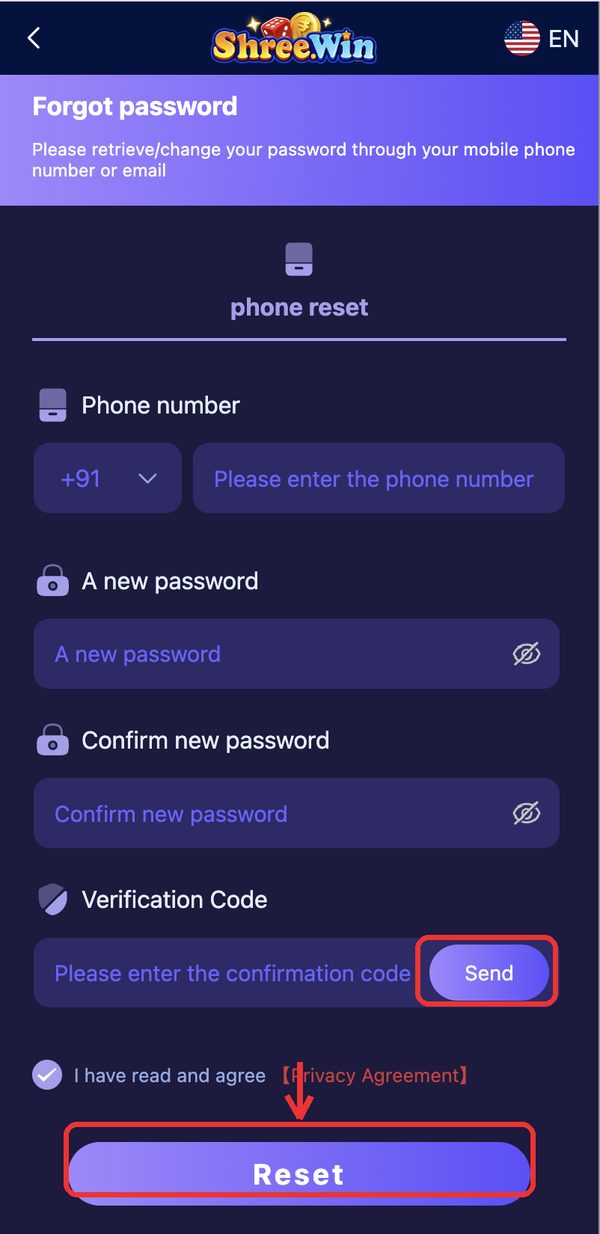
Enter the code, tick the Privacy Agreement, and tap Reset.
Go back to the login screen and sign in with the new password.
No verification code arriving
Wait a full minute before tapping Send again; repeated taps queue extra codes and the last one is the valid one.
Check that the number typed is the registered one, that the SIM is active with signal, and that SMS from unknown senders is not being filtered. Airplane mode on and off resets the network. If three sends bring nothing, stop and use the fallback below.
Fallback: customer service reset
The login header says it plainly: if you forget your password, contact customer service. Open the app or the website on any device where you are still logged in and go to Account, then Customer Service under Service center.
If no device is logged in, use the customer-service entry on the login screen. Give the registered +91 number, roughly when you registered, and your last deposit amount so support can verify the account. Never send the old password or a code that arrived by SMS to anyone who contacted you first.
While you wait and after the reset
Balance, bet history and saved UPI or bank details sit on the server against your number; reinstalling or switching phones changes nothing. Do not create a second account on another number; it cannot be merged.
After the reset, choose a password you do not use on payment apps, check the saved withdrawal methods for anything you did not add, and if you ever typed the login into a prediction panel or a mod APK, reset once more after uninstalling it.
The scam that follows a lost password
Post about a lost password in a group and within hours someone offers to recover it for a fee or asks for the code that just arrived. Both are theft. The real reset costs nothing, happens only inside the app, and never involves a payment.
Frequently Asked Questions
Does Shree Win have a password reset?
Yes. Forgot password? on the login screen opens a phone reset form: registered +91 number, new password twice, an SMS verification code, then Reset.
The verification code never comes. What now?
Wait a minute, resend once, check signal and the number. If it still fails, contact in-app customer service from a logged-in device or the login screen and ask for a reset on your registered number.
I lost the registered phone number. Can I recover the account?
Only through customer service with the old number, registration date and deposit history; whether a number change is allowed is decided by the platform.
Someone offered to reset my password for Rs 500. Is that support?
No. The reset is free and inside the app. Report the account and do not pay.
More Shree Win guides
Disclaimer
This is an independent guide and affiliate website. We do not own or operate the Shree Win platform. We may earn a commission when you register through links on this site, which never changes what you pay or receive. Real-money games carry genuine financial risk and can be habit-forming. Strictly for adults aged 18 and over. Real-money gaming is restricted in Andhra Pradesh, Telangana, Assam, Odisha, Nagaland and Sikkim; residents of those states should not play. Set your own limits before you deposit, and stop if it stops being fun.